Rust-Python interface
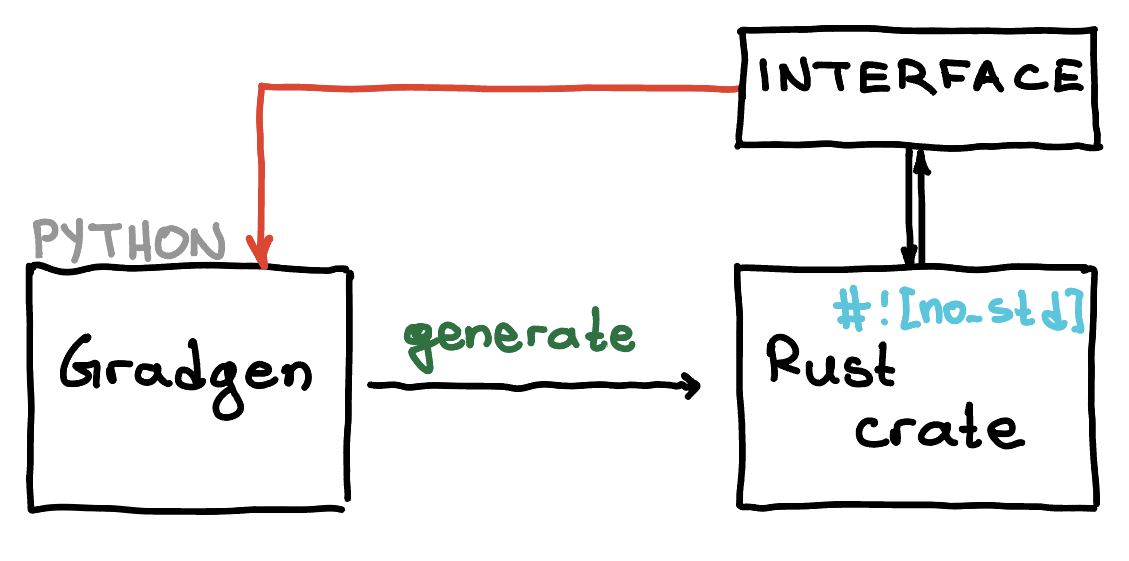

Once you have generated a Rust crate for your functions, you can consume it directly from Python.
This is done by using .with_enable_python_interface() as shown below
x = SXVector.sym("x", 2)
w = SXVector.sym("w", 1)

energy = Function(
    "energy",
    [x, w],
    [x.norm2sq() + w[0], x[0] + x[1]],
    input_names=["x", "w"],
    output_names=["cost", "state"],
)

project = (
    CodeGenerationBuilder()
    .with_backend_config(
        RustBackendConfig()
        .with_crate_name("blah")
        .with_backend_mode("no_std")
        .with_scalar_type("f64")
        .with_enable_python_interface() # <-- this
    )
    # Specify what needs to be generated
    .for_function(energy)
        .add_primal()
        .done()
    .build("./my_crates")
)
This will generate a crate in ./my_crates/blah and a Python interface in
./my_crates/blah_python.
Details
The generated Python wrapper uses its own pyproject.toml version. The first
time the interface is generated, that version is 0.1.0. If you regenerate
the same interface later, Gradgen bumps the wrapper version to 0.2.0, then
0.3.0, and so on. The low-level Cargo crate version does not change.
Moreover, the low-level Rust code is no_std, but the Python interface is not.
If you also want Gradgen to compile the generated Rust crate immediately after writing it, enable:
RustBackendConfig().with_build_crate()
That step is optional and defaults to off. When it is enabled, Gradgen runs
cargo build --release for the generated low-level crate by default and
raises an informative error if cargo is not installed. If you want a faster
debug-style build during development, use
RustBackendConfig().with_build_profile("debug").
You can now use this as a python module. You can then do
import blah

print(blah.__version__)
print(blah.__all__)
If you want to get a list of all functions in blah, do
print(blah.all_functions()) # prints ['energy']
Calling functions
Create a workspace
To call any function from the generated package, blah, you first need
to create a workspace variable. This is the only time you will need to allocate
memory. To allocate memory for the function energy do
# Do this once
wspace = blah.workspace_for_function('energy')
Call the function
You can now call the function as follows
x = [1., 2.]
w = [3.]
result = blah.energy(x, w, wspace)
This returns a dictionary with the output or outputs of the function - in this case
{
    'cost': 8.0,
    'state': 3.0
}
Alternatively, you can also call functions using call as follows
result = blah.call('energy', x, w, wspace)
Metadata
If you want to get metadata about a function (e.g., inputs, outputs and their dimensions)
you can use function_info. For example,
print(xyz.function_info('energy'))
prints out the following information
{
    'name': 'energy',
    'rust_name': 'xyz_energy_f',
    'workspace_size': 2,
    'input_names': ['x', 'w'],
    'input_sizes': [2, 1],
    'output_names': ['cost', 'state'],
    'output_sizes': [1, 1]
}
Example with multiple functions
You can of course interface a crate that contains multiple functions. For example, suppose you have the functions:
x = SXVector.sym("x", 2)
w = SXVector.sym("w", 1)

energy = Function(
    "energy",
    [x, w],
    [x.norm2sq() + w[0].exp(), x[0] + x[1]],
    input_names=["x", "w"],
    output_names=["cost", "state"],
)

magic = Function(
    "magic",
    [x, w],
    [x.sin().norm2sq() * w[0]],
    input_names=["x", "w"],
    output_names=["a"],
)
and you generate a Rust crate along with a Python module as follows:
project = (
    CodeGenerationBuilder()
    .with_backend_config(
        RustBackendConfig()
        .with_crate_name("xyz")
        .with_backend_mode("no_std")
        .with_enable_python_interface()
    )
    # Specify what needs to be generated
    .for_function(energy)
        .add_primal()
        .done()
    .for_function(magic)
        .add_primal()
        .add_gradient()
        .add_hessian()
        .add_joint(
            FunctionBundle().add_f().add_jf(wrt=0).add_hvp(wrt=0)
        )
        .done()
    .build('./my_crates')
)
You can then import the auto-generated module xyz
import xyz

print(xyz.all_functions())
# This prints:
# [ 'energy', 'magic', 'magic_grad_x', 'magic_grad_w',
#   'magic_hessian_x', 'magic_hessian_w', 'magic_f_jf_hvp_x']
and you can call, say, the function bundle magic_f_jf_hvp_x as follows:
# Allocate memory by creating a workspace object
wspace = xyz.workspace_for_function('magic_f_jf_hvp_x')

# Call the function
x = [1., 2.]
w = [3.]
v = [0.5, -0.1]
result = xyz.magic_f_jf_hvp_x(x, w, v, wspace)
The result is a dictionary with the outputs of the function
{
    'a': 215.63522999585246,
    'jacobian_a': [2.727892280477045, -2.270407485923785],
    'hvp_a': [-1.2484405096414266, 0.3921861725181672]
}